
Delete an event
Introduction
If you want to remove an event from your archive, you can delete it directly from the Events section.
Artshell lets you delete a single event or multiple events at once, making it easier to manage your calendar when you need to remove events that are no longer scheduled or were created by mistake.
In this guide, you'll learn how to delete one or more events and what to check before confirming the action.
Before You Begin
Before deleting an event, make sure you have selected the record and that you no longer need the associated information.
Warning: Deleting an event is permanent and cannot be undone. Once confirmed, the record cannot be recovered.
Delete a Single Event
- Go to the Events section;
- Open the record you want to delete;
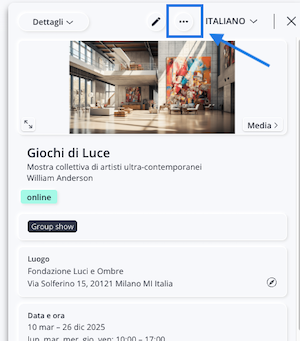
- Click the icon to open the actions menu.
- Select the last option, Delete.
- A confirmation dialog box will appear. To permanently delete the event, click Delete. If you selected the event by mistake, click Cancel.
Delete Multiple Events
To delete multiple events at once:
- Go to the Events section.
- Click " Select."
- Select the Artworks want to delete.
- Click the icon from the menu Manage .
- Click the last option, " Delete."
- Confirm the action by clicking Delete in the confirmation dialog box.
Conclusions
Delete an event only when you are certain you no longer need the corresponding record, since this operation is final and cannot be undone.