
Email address statuses
Introduction
Each email address listed in the " Contacts " section has a status that indicates whether it can receive messages sent through Artshell. Understanding the meaning of the different statuses allows you to keep your database up to date, improve the quality of your newsletters, and correctly interpret campaign analytics.
In this guide, you'll learn the meaning of each status and how to use it to best manage your contact list.
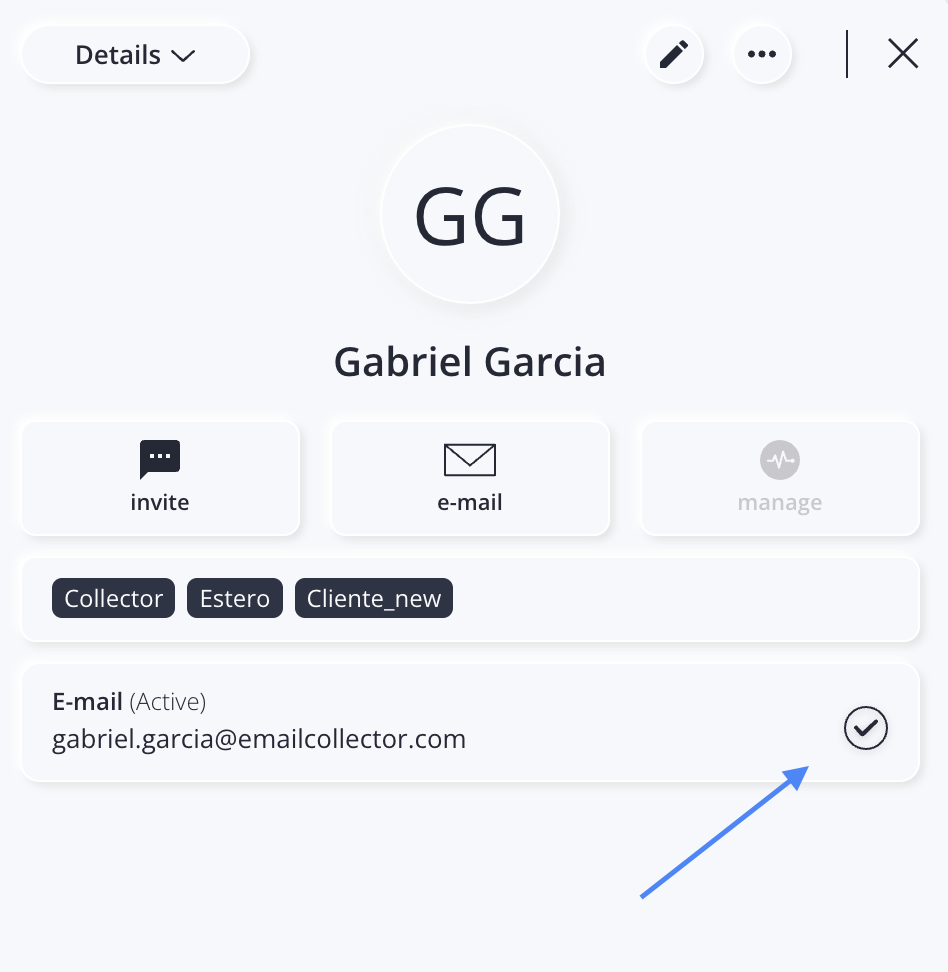
Below is an example of where a contact's status is located (in this case, it is "Active"):
Why are status updates important?
When you send a newsletter, Artshell automatically checks the status of the email addresses.
Only eligible email addresses will receive the message. In this way, the system helps maintain the high quality of mailings and protect the sender's domain reputation.
Available statuses
Active
Status Active Select an email address that can receive messages sent through Artshell.
Active addresses:
- receive newsletters;
- They receive individual emails.
Inactive
The state Inactive Indicates a valid email address that has been excluded from the newsletter mailing list.
An email address can become inactive in two cases:
- manually, if you choose to turn it off.
- automatically, if the recipient does not open 20 consecutive messages;
Inactive addresses:
- ❌ do not receive newsletters;
- ✅ They can still receive individual emails.
The status can be changed manually at any time. To enable or disable the inactive status, click the icon so that it becomes a circle with a checkmark (Status: Active).
Why does Artshell automatically deactivate certain addresses?
Continuing to send newsletters to recipients who have not interacted with them for an extended period can damage the sender's domain reputation and reduce the deliverability of your communications.
For this reason, after 20 consecutive emails that were not opened, Artshell automatically stops sending newsletters to those email addresses.
This threshold is part of the engagement monitoring logic used by the email delivery service and is intended to maintain the quality of email campaigns over time.
————-
Why exactly 20 communications?
The threshold used by Artshell follows the best practices of the email delivery service used by Artshell (Amazon SES) and has been set to prevent an email address from being excluded after only a few unopened newsletters. The goal is to identify only those recipients who, over time, show no interaction with the communications, thereby helping to preserve the sender domain’s reputation and the deliverability of the emails.
Bounced
A status Bounced Indicates an address that is formally correct but could not be reached by the destination server.
The most common causes are:
- mailbox no longer exists;
- mailbox full;
- temporary server issues;
- other technical delivery errors.
Bounced email addresses:
❌ do not receive newsletters;
❌ They do not receive bulk emails.
Artshell automatically excludes them from future mailings to protect the domain's reputation.
Note
To understand how bounces are detected and how to interpret them, see the article Email and Newsletter Analysis.
Why might an email address already be marked as "bounced"?
An email address may be marked as " bounced " even if no message has yet been sent from your account.
To protect the reputation of sender domains and improve the quality of mailings, Artshell also takes into account the technical information collected by the platform regarding the deliverability of email addresses.
If an address has already been identified as undeliverable, it can be marked as "Bounced" even when added to another Artshell account, thereby preventing further delivery attempts to mailboxes that have already returned delivery errors.
This check pertains solely to the technical ability to deliver an email and does not involve the sharing of data, content, or Contacts information Contacts different accounts.
Unsubscribed
A status Unsubscribed indicates a recipient who has chosen to stop receiving newsletters by clicking on the link Unsubscribe included in messages sent through Artshell.
The contact remains in the database, but:
- ❌ does not receive the newsletter;
- ✅ Can receive individual emails.
The status cannot be changed manually.
Click on the questions below to expand them and read the answers:
Can I change the unsubscribed status and reactivate a subscribed email address?
The status cannot be changed manually by the user. However, if the recipient has explicitly requested explicitly to be re-subscribed—for example, because they unsubscribed by mistake or wish to receive your communications again—you can update the status and set the address to “subscribed” again.
In that case, ask the contact to subscribe to your newsletter again:
- Select the icon at the bottom right.
- Select the " Newsletter Sign-up Form" option.
- If you haven't activated it Enable the newsletter subscription form by flipping the switch .
- Click the link in the " Link " field of the sign-up form to copy it, then send it to the contact who wants to subscribe to your newsletter again.
Can I remove the "Unsubscribe" link from my Artshell emails?
No, it’s not possible, and for very good reasons:
- It is required by law: many jurisdictions, including the European Union under the General Data Protection Regulation (GDPR), require that email marketing communications provide a simple way for recipients to withdraw their consent. In Italy, the Personal Data Protection Code also requires that an opt-out option be provided.
- Failure to provide an unsubscribe option may result in severe penalties.
- This is a best practice: it helps build trust with your Contacts reduces the likelihood of your emails being marked as spam.
For more information, check out this article from Iubenda.
Summary Table
In the table below, “individual emails” refer to messages sent to one or more recipients entered individually—e.g., mario.rossi@galleria.com—while “newsletters” refer to messages sent to larger groups of Contacts e.g., the Contacts list or the “VIP” tag. The table shows which types of messages email addresses can receive based on their status.
| Email Address Status | Newsletter | Individual emails |
|---|---|---|
| Active | ✅ | ✅ |
| Inactive | ❌ | ✅ |
| Bounced | ❌ | ❌ |
| Unsubscribed | ❌ | ✅ |
How to search for Contacts status
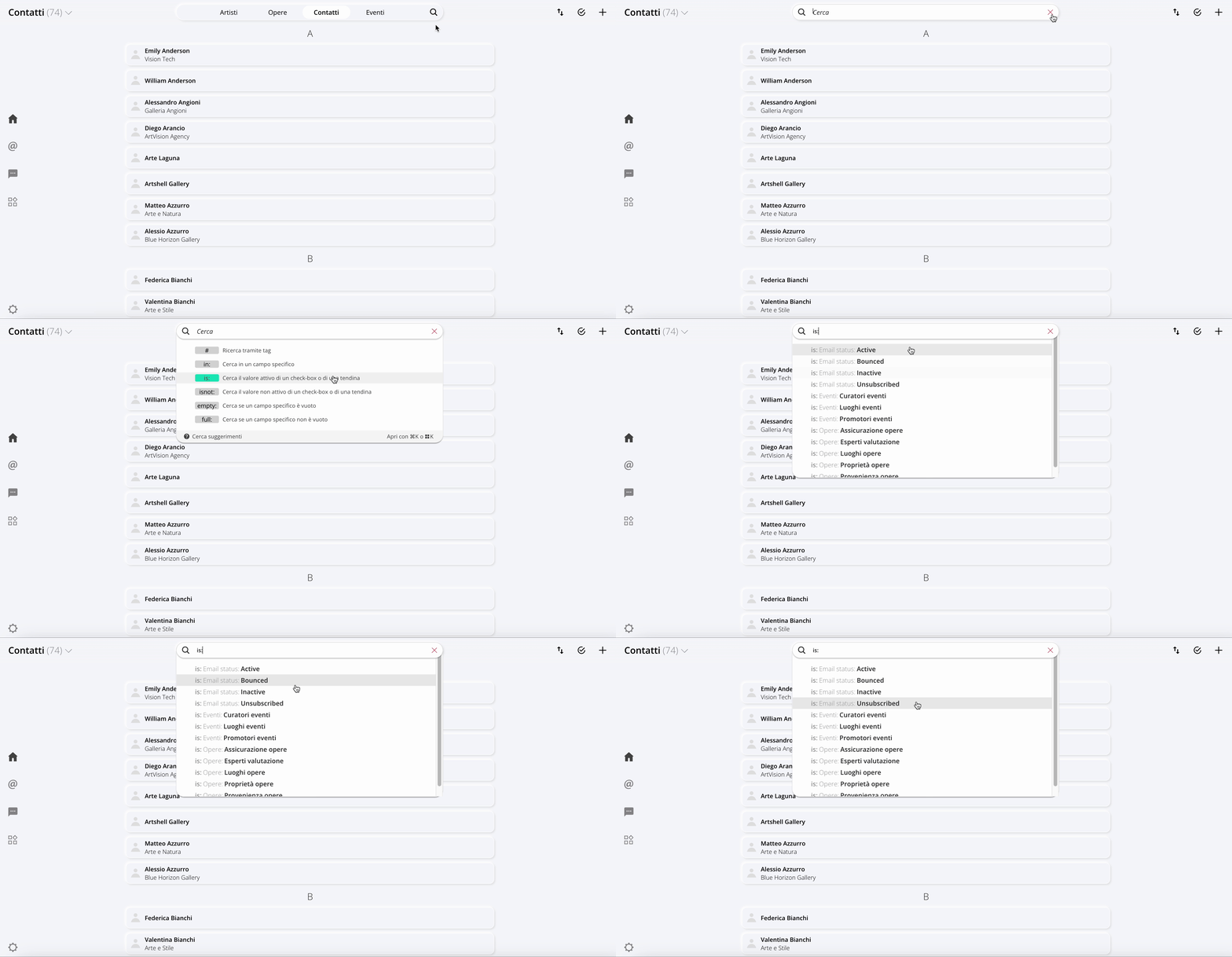
You can filter your Contacts the search bar in the Contacts section. Select the operator is: and then choose one of the following values:
- active
- inactive
- bounced
- unsubscribed
This way, you can quickly identify all Contacts a specific status.
When should you check the statuses?
We recommend that you periodically check the status of your database, especially after sending a newsletter.
Tracking bounced, inactive, and unsubscribed addresses allows you to keep your mailing list up to date and improve the deliverability of your communications.
For more information, see also:
Conclusions
Email address statuses are a key tool for understanding the quality of your database and ensuring your communications remain effective.
By checking them regularly, you can identify invalid email addresses, monitor recipient engagement, and gradually improve the performance of your newsletters.