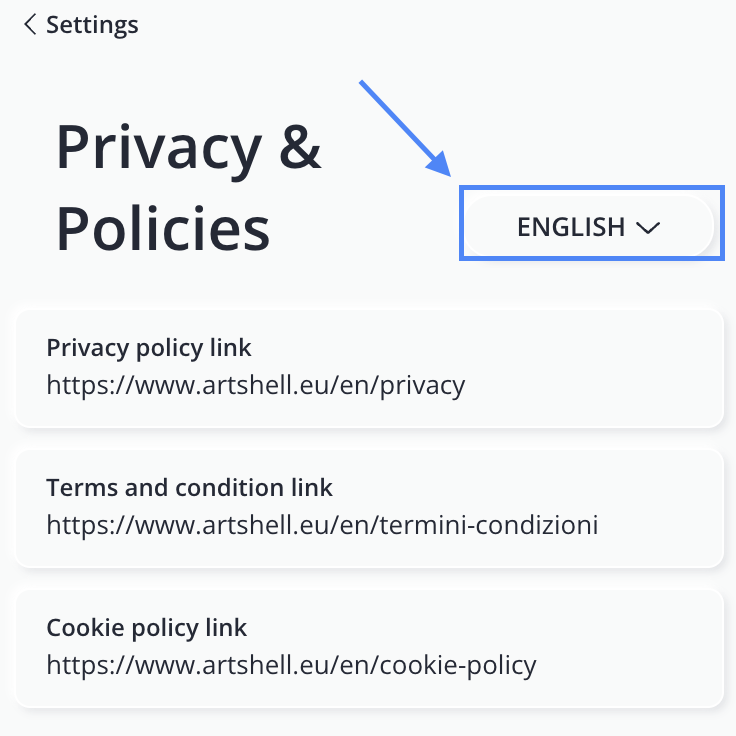
Add links to your Privacy Policy, Cookie Policy, and Terms and Conditions.
Introduction
In an increasingly digital world, privacy protection and the management of personal data have become essential. This article provides you with the information you need on how and why to include links to your policies on Artshell so that your customers can view them.
Not just for Artshell!
It is important to note that links to privacy policies and terms and conditions are not required solely for using Artshell. If you own a website, you should already have these pages in place to comply with applicable regulations and protect your users.
If you haven't created them yet, you can use specialized online services (such as Iubenda) or consult a legal advisor for personalized advice.
Links to be set up
- Privacy Policy. Enter the link to your Privacy Policy here so that users can easily see how their personal data is handled.
- Terms and Conditions. Link this section to the Terms and Conditions so that users have clear access to the rules, responsibilities, and terms of use for the service.
- Cookie Policy. Add a link to the Cookie Policy to transparently explain which cookies are used, for what purposes, and how users can manage their preferences.
Why is it important to set up these links?
Setting up these links is crucial for several reasons, both legal and related to transparency toward users, specifically:
- Privacy Policy: It is required by the General Data Protection Regulation (GDPR) and informs users about how their personal data is collected, used, and protected. Furthermore, failure to comply may result in significant financial penalties.
- Terms and Conditions: These define the rights and obligations of the user and the organization and establish the rules for using the website or app.
- Cookie Policy: This policy is required by the General Data Protection Regulation (GDPR) and informs users about the use of cookies and other tracking technologies.
Providing clear access to these policies demonstrates transparency and respect for your users' privacy.
How to insert links
Click the icon bottom left to open the Settings panel.
Select the "Privacy & Policy" option . Copy the links to your privacy policy, terms and conditions, and cookie policy, and paste them into the respective fields where it says " Enter the link here for... (privacy policy, terms, etc.)."
How to get the link to the privacy policy:
If you have saved your documents only in Word or PDF format , you can upload the document to a file-sharing service such as Google Drive or use the Medialibrary . If you want to use the Medialibrary, follow these steps:
- Within the section Contacts, click the Click the button in the upper right corner to create a record , then fill in the field Company with the name of your organization, for example "XYZ Gallery".
- Click the Save button in the upper-left corner of the record.
- Open the Details tab and select File.
- Click the to select the privacy policy document you want to include in the File.
- If the document is not yet in the Medialibrary, click the to import it from your computer. Make sure to name it clearly, for example "Privacy Policy 2025", so you can find it quickly in the future.
- Once uploaded to the Medialibrary, select it and click the Add button at the top.
- Click the icon and select the second option Copy to clipboard.
- Go back to the Settings panel, under Newsletter subscription form, and paste the link into the Privacy policy link field.
If you share your form with an international audience, be sure to include the privacy policies in English and French as well to avoid any issues. Use the multilingual menu to change the language.